
Weekly revenue
Weekly downloads
Rating
Price
Weekly revenue
Weekly downloads
Rating
Price
Subscribe to see revenue estimates, ads, complaints and keywords.
Launch offer: 50% off until October 31, 2026


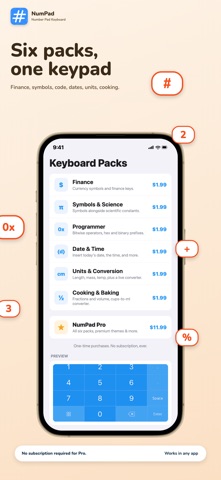


Type a number, get an answer. NumPad puts a full numeric keypad and calculator right inside your iPhone keyboard. Type "1200*0.0825" and the answer floats above your cursor before you even reach for "=". Tap it to insert, or keep typing to refine. LIVE MATH, WHILE YOU TYPE Start any expression — "84.50*1.18", "250-20%", "3*12+40" — and a floating result chip appears above the cursor as you type. Same engine as the "=" key and Siri, with zero extra taps. KEYBOARDS FOR YOUR ACTUAL WORK Swap in a specialty key layout for what you're doing — six packs included: • Finance — currency symbols for fast price entry • Symbols & Science — π, √, ^, ° and math notation • Programmer — hex prefixes and bitwise operators • Date & Time — today's date or the current time in one tap • Units & Conversion — length, mass, temperature with a live offline converter • Cooking & Baking — fraction keys (½ ⅓ ¼) plus cups-to-millilitres converter PRO SHORTCUTS Long-press "%" for a two-step tax + tip calculator. Long-press "." for reusable text snippets. Long-press "0" for clipboard history. Long-press "=" for the unit and recipe converter. Every calculation lands on a running result tape you can revisit anytime. BUILT FOR THE LATEST iOS NumPad speaks Siri: "Calculate with NumPad," "Convert units with NumPad," and "Calculate a tip with NumPad" work the moment the app is installed — no setup. Every pack runs fully offline. On the latest iOS, the optional Glass theme uses real Liquid Glass, matched for light and dark mode. YOUR LAYOUT, YOUR CALL A custom keyboard with the layout you choose — full keypads, compact rows, your arrangement. If you enter numbers anywhere — payments, spreadsheets, expenses, code, recipes — NumPad pays for itself the first day.
Not on the US charts right now.