Weekly revenue
Weekly downloads
Rating
Price
Weekly revenue
Weekly downloads
Rating
Price
Subscribe to see revenue estimates, ads, complaints and keywords.
Launch offer: 50% off until October 31, 2026
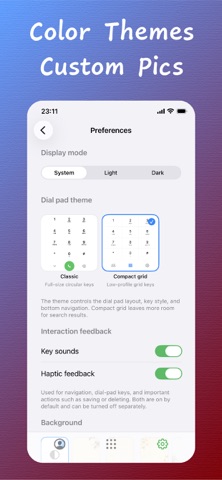
T9 Quick Dial is a contacts enhancement tool that makes the iPhone dialer smarter with name T9 search. By batch-writing the initials/spelling patterns of names into the "Nickname" field of your contacts, the iPhone system dialer can instantly search named contacts via the numeric keypad — no jailbreak required, no system dialer replacement, and no system file modifications. 【Core Features】 ▸ T9 Name Dialing Real-time numeric keypad search: type 98 to instantly match contacts with initials ZT (e.g., "Zack Taylor"). Supports multi-dimensional matching by initials, full spelling, T9 digits, and phone numbers. Matched characters are highlighted in orange. ▸ Batch Write T9 Tags Generate T9 tags for all contacts and write them into the Nickname field with one tap. Three modes available: • T9 Letters: Append initials (Zack Taylor → Zack ZT) • T9 Digits: Append digit string (Zack Taylor → Zack 9825) • T9 Combo: Write initials + full name spelling + given name spelling at once — no matter what you type, you'll get a hit Smartly preserves original nicknames and automatically deduplicates existing tags. Your notes are never overwritten. ▸ Per-Contact T9 Configuration Fine-tune T9 tags for individual contacts. Automatically generates multiple suggestions (initials shorthand, T9 digits, full name spelling, etc.) with support for manual customization and real-time preview. 【Contact Management】 ▸ Smart Search Full-dimensional search across name, phone, nickname, initials, and full spelling. Type zt to instantly find Zack Taylor, or taylor to find Taylor Swift. ▸ Contact Details Large avatar + complete information display. Localized phone labels (Mobile/Work/Home). One-tap dial, text, or email. Full support for company, department, job title, address, birthday, and notes. ▸ Contact Editing Full-field editing: name, spelling, multiple phone numbers, multiple emails, multiple addresses, company info, and notes. When creating a new contact from the dialer with no match, the number is automatically filled in. ▸ Duplicate Contact Merge Identifies duplicates by phone number, email, or name. One-tap merge and deduplicate, preserving the complete information from the first contact. ▸ Business Card Scan & Recognition Batch import via camera or photo album. On-device OCR supports both Chinese and English, automatically extracting name, phone, email, and company. Edit field by field before saving. All processing is local — your photos are never uploaded. ▸ Contact Statistics Total count, counts of contacts with phone/email/company, Top 10 geographic distribution, and Top 10 company distribution. 【Recent Calls】 In-app call history with one-tap dial, SMS, and swipe-to-delete per entry. Batch selection and deletion in edit mode, or clear all with one tap. 【Data Security】 ▸ Original Backup: Auto-backup of original nicknames before first processing. One-tap full restore or selective restore. ▸ Operation History: Complete records of content before and after each write. ▸ Local Processing: All data processed locally — no network requests, no cloud uploads, no third-party analytics SDKs. 【How to Use】 Grant contacts access permission on first launch Go to Management → Batch Write T9 Tags Choose a write mode (T9 Combo mode recommended) Wait for batch processing to complete Open the iPhone system dialer and type digits to search contacts instantly 【Privacy Commitment】 • We do not upload your contact data • We do not upload business card photos • We do not integrate any third-party analytics SDKs • No network requests are made • All processing is done locally on your device 【Who This Is For】 • Users who are accustomed to T9 quick dialing • Users with large contact lists and slow search • Users who want the system dialer to support name search • Business professionals who need to manage contacts in bulk
Not on the US charts right now.