Monthly revenue
Monthly downloads
Rating
Price
Monthly revenue
Monthly downloads
Rating
Price
Subscribe to see revenue estimates, ads, complaints and keywords.
Launch offer: 50% off until October 31, 2026
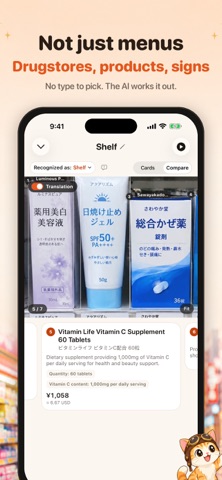
You sit down. The menu is handwritten, the server is already at the table, and you recognize maybe two characters on the page. Take one photo. It works on drugstore shelves, product labels and signs too. In two to eight seconds every dish comes back readable: what it is in your language, the original text, how to say it out loud, the price and the main ingredients. Not word for word: oyakodon comes back as chicken and egg simmered over rice, not "parent and child bowl." CARDS OR COMPARE Switch the result between "Cards" and "Compare". Compare puts each translation right where the dish is printed on your photo. Pinch to zoom, swipe the cards and the photo follows, tap a box and its card comes up. Press and hold the photo to hide the labels. The current category and your picks per category stay in view. NOT JUST MENUS Medicine and skincare at a drugstore, a shelf of look-alike snacks, a notice at the train station: there is nothing to choose first. The AI works out what you shot and labels it, like "Identified as: Menu". Products get what they are and how to use them (dosage first for medicine), shelves get how the items differ, and signs get the main point first, then every line. Wrong guess? Tap the label, pick the right type and re-run it for free. SEE WHAT A DISH LOOKS LIKE Tap "See photos" for up to three reference photos of a dish. Each names its source site and links back to it. They come from the web, so the restaurant's version may look different. SHOW TO STAFF Tap + to add dishes, set quantities and add notes like "No cilantro". "Show to staff" opens a large-print page: a request in the local language to check dish names, quantities and prices, with a line telling you what it says; the list grouped by category; and your picks circled on the menu photo. The server taps OK and you see "Staff confirmed". Works offline. HARD MENUS WELCOME Handwritten specials taped to the wall, a chalkboard by the door, an izakaya lit by one bulb. MenuKa reads those, and you can import from your library too. Sideways shots are straightened automatically, and a dish too hard to read is flagged instead of getting a made-up name. The first dish lands in about two seconds and the rest fill in while you read. ALLERGENS, DIETS AND PRICES Common allergens are flagged for you. Filter for vegetarian, vegan, halal, kosher, gluten-free or lactose-free, and the rest fade back. Every price also shows in the currency you choose, from a built-in rate table that works offline and refreshes weekly. Some dishes carry a calorie estimate too. HEAR IT, KEEP IT Tap a dish and your iPhone says it out loud, free and unlimited. Scans are saved to your history, photo included, on your iPhone only, so you can compare again or rename them later. LANGUAGES Japanese, Korean, Thai, Vietnamese, Chinese, French, Italian, Spanish, German, Turkish and more. PRIVACY Scan photos are processed, then discarded, unless you choose to attach one to "Inaccurate recognition" feedback. Location is optional, read only while the app is in use, and blurred to about one kilometer. SUBSCRIPTION DETAILS MenuKa includes two free translations per day. Unlimited translation is available through: - 7-Day Pass: one-time payment, does not renew - Monthly subscription: auto-renews monthly, with a 3-day free trial before any payment - Lifetime: pay once and keep it Only the monthly subscription renews automatically, unless auto-renew is turned off at least 24 hours before the end of the current period. Your Apple ID is charged at confirmation of purchase, and renewals are charged within 24 hours before the end of each period. Manage or cancel anytime in Settings > Apple ID > Subscriptions. Any unused part of a free trial is forfeited when you purchase a subscription. Privacy Policy: https://menuka.app/privacy Terms of Use: https://menuka.app/terms Support: [email protected]
Not on the US charts right now.