
Aylık gelir
Aylık indirme
Puan
Fiyat
Aylık gelir
Aylık indirme
Puan
Fiyat
Gelir tahminlerini, reklamları, şikâyetleri ve anahtar kelimeleri görmek için abone ol.
Lansman fırsatı: 31 Ekim 2026 tarihine kadar %50 indirim

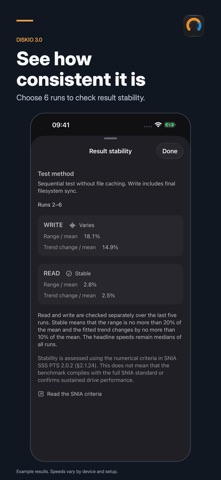

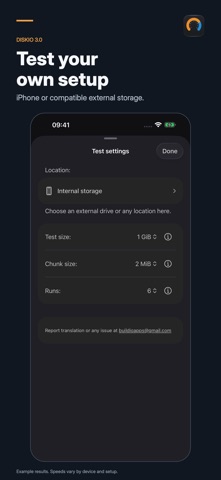
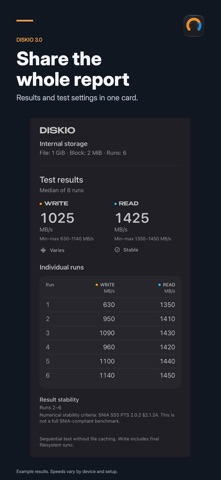

How fast is your storage? Measure sequential read and write speeds on your iPhone or a compatible external drive. Go beyond one number with repeat runs and a detailed report. SEE THE WHOLE RESULT Choose 1, 3 or 6 runs. With 3 or 6 runs, see median read and write speeds, minimum and maximum values, and the result of every run. CHECK CONSISTENCY Choose 6 runs to assess read and write stability separately over the last five. See whether results are stable or vary, with the criteria explained in the app. TEST YOUR SETUP Use your iPhone's internal storage or select a compatible, writable external drive through Files. Choose a test file from 1 to 5 GiB and a block size of 1, 2, 4, 8 or 16 MiB. The defaults are 6 runs, a 1 GiB file and a 2 MiB block. UNDERSTAND THE MEASUREMENT Diskio 3.0 reworks the speed calculation and test-file sizing. Speeds are shown in MB/s, and write timing includes final filesystem synchronization. Follow each write and read phase as the test runs. SHARE THE DETAILS Send a result card with the full report, test settings and, after 6 runs, the stability assessment. The redesigned interface supports light and dark appearances, larger text and Reduce Motion. GET STARTED 1. Select your storage and test settings. 2. Start the test and keep Diskio open. 3. Review the report or share your results. A test needs enough free space for a temporary file. External storage must be accessible and writable through Files. Results depend on the device, storage, connection, free space and test settings. The stability assessment adapts numerical criteria from SNIA SSS PTS. It is not a full SNIA-compliant benchmark, a drive-health check or a sustained-performance rating. Measurements in version 3.0 may differ from earlier versions because the method has changed.
Şu anda ABD listelerinde yok.