
Haftalık gelir
Pro'da görünür
Haftalık indirme
Pro'da görünür
Puan
—
Fiyat
$1,99
Sadece aboneler
Gelir tahminlerini, reklamları, şikâyetleri ve anahtar kelimeleri görmek için abone ol.
Lansman fırsatı: 31 Ekim 2026 tarihine kadar %50 indirim
Haftalık gelir
Haftalık indirme
Puan
Fiyat
Gelir tahminlerini, reklamları, şikâyetleri ve anahtar kelimeleri görmek için abone ol.
Lansman fırsatı: 31 Ekim 2026 tarihine kadar %50 indirim


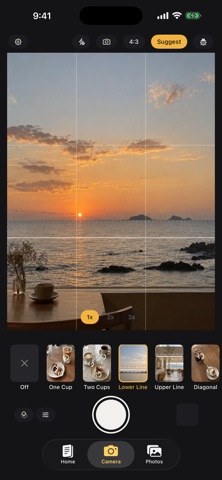
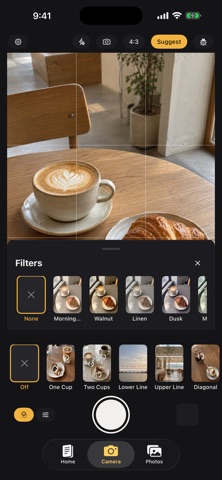

The things that get in the way of a good photo are usually small. Where does the cup go? Should the phone be a little higher? Is the person too close to the edge? Is the horizon straight? Open the camera and the viewfinder shows you where things should sit, along with a hint on what to adjust. Move the phone, change the angle, and shoot once it lines up. On a table, the guides follow your angle, top-down or tilted, and show where the cup, the plate, and the food should go. For scenery, the screen helps you level the horizon and suggests where to place it in the frame. For people, it shows where the person should stand for a full-body, half-body, or close-up shot. Only one hint shows at a time, so the viewfinder stays clear. Want a different look? Pick another layout from the strip. Each one comes with a sample photo and a short note. Handing the phone to a friend? Choose the layout first, then ask them to match the lines on the screen. Even someone who has never thought about photography can get close to the shot you had in mind. Before you shoot, try a different tone: milky white, warm wood, blue-green, a dark look, or film grain. After the shot, adjust the tone again, plus exposure, contrast, saturation, and warmth. The original is kept; edits are saved as a new photo. Image recognition runs on your phone. No account is needed, and neither the viewfinder nor your photos are sent to a server. On iPhones that support Apple Intelligence, you also get a one-line comment on the composition after each shot. Other iPhones keep every shooting, framing, and color feature. One-time purchase. No ads, no subscription, no in-app purchases.
Şu anda ABD listelerinde yok.